How to Build Your Own Website with Claude Code (No Coding Required)
By Meg Faibisch Kuhn
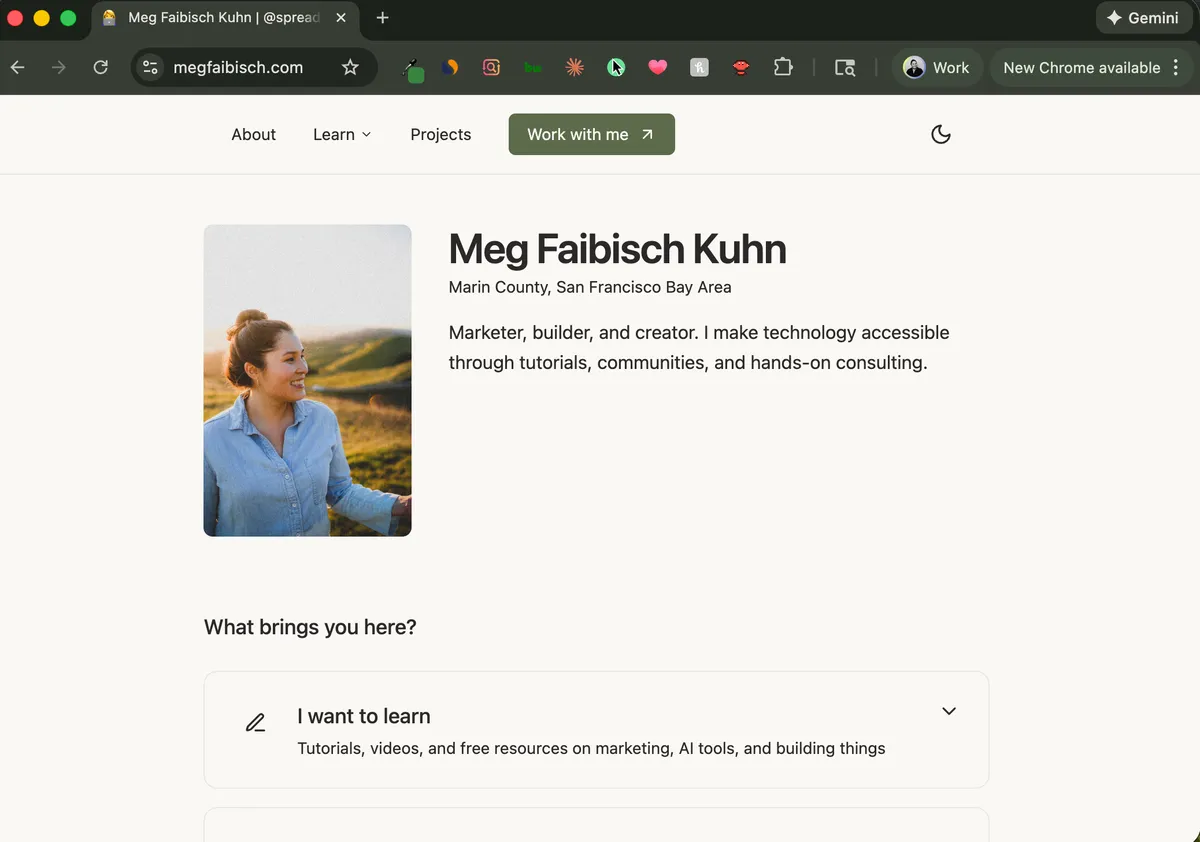
You don't need to know how to code to build a beautiful, professional website.
I built this entire website by talking to an AI. No WordPress. No Squarespace. No hiring a developer. Just me describing what I wanted, and Claude Code making it happen.
And honestly? It's better than anything I could have built with a drag-and-drop builder.
Why Build with Claude Code Instead of Squarespace/Framer/etc?
Let me be real about the tradeoffs.
Squarespace/Framer/Wix are great if you want something up fast with minimal friction. They cost $15-50/month, and you get templates that look decent.
But here's what frustrated me about those platforms:
- You're locked into their templates. Want to do something slightly custom? Good luck.
- Monthly fees add up. $20/month is $240/year. Forever.
- You don't own your site. They control the hosting, the code, everything.
- "Drag and drop" sounds easy until it isn't. Ever tried to get spacing just right in Squarespace? I wanted to throw my laptop.
Building with Claude Code costs me $20/month for Claude Pro (which I was already paying for) plus ~$0 for hosting on Vercel's free tier. I own everything. And instead of fighting with drag-and-drop, I just... describe what I want.
"Make this section feel more spacious."
"Can you add a contact form that emails me when someone submits?"
"I want a blog where I can write in markdown."
And it happens.
What You'll Actually Need
Here's the full stack I use for this site:
| What | Why | Cost |
|---|---|---|
| Claude Desktop | The AI app that writes your code | $20/mo (Claude Pro) |
| GitHub | Saves your code and tracks changes | Free |
| Vercel | Hosts your site on the internet | Free tier |
| Cloudflare | Where you buy your domain | ~$10/year |
| Resend | Sends emails from your contact form | Free tier |
Total ongoing cost: $20/month while building (just Claude Pro). Once your site is done, you can cancel Claude Pro and your site stays live on Vercel for free—you'd only need to resubscribe if you want to make changes.
One-time cost: ~$10 for a domain name
Compare that to Squarespace at $23/month ($276/year) or Framer at $20/month ($240/year) - and you actually own what you build.
How the Process Actually Works
Here's what a typical building session looks like:
1. You describe what you want
"I want to build a personal website. It should have a homepage with my name, what I do, and links to my social media. I want it to feel clean and minimal, like a portfolio site."
2. Claude Code creates the structure
Claude will set up your project with all the right files and folders. You don't need to understand what they all do - Claude handles it.
3. You react and refine
This is where the magic happens. You look at what Claude created and give feedback:
- "The spacing feels too tight, can you add more whitespace?"
- "I want my name to be bigger and bolder"
- "Can you make the background a warm cream color instead of white?"
- "This looks too corporate - make it feel more personal"
4. You iterate until it's right
You're not writing code. You're having a conversation. Just like you'd give feedback to a designer, except the changes happen in seconds instead of days.
A Real Example from This Site
When I was building my homepage hero section, here's an actual exchange I had:
Me: "I want a hero section that feels clean and minimal. My name big, a short tagline underneath, and maybe some social proof badges."
Claude: creates a hero section
Me: "The spacing feels too tight. Can you make it breathe more? And make my name bigger - I want it to be the first thing people see."
Claude: adjusts spacing and typography
Me: "Better. But the badges look cheap. Can you make them more subtle? Like they're part of the design, not floating on top of it."
Three back-and-forths and I had exactly what I wanted. No Figma mockups. No CSS tutorials. Just conversation.
What You Can Build
Just to give you a sense of what's possible with this approach:
- A homepage with your bio, photo, and links
- A blog where you write posts in plain text and they look beautiful
- A contact form that sends submissions to your email
- A services/work page showcasing what you do
- Dark mode (I mentioned once that it would be cool, and Claude just added it)
- Analytics to see who's visiting your site
- Newsletter signup that connects to your email list
- Custom design that matches your brand colors and vibe
This site has all of the above, and I built it through conversation.
The Catch (Being Honest)
This approach isn't for everyone. Here's when you should probably use Squarespace instead:
- You need something live in 2 hours. Claude Code is fast, but there's still a learning curve.
- You hate troubleshooting. Sometimes things break. Claude can usually fix them, but you need patience.
- You want zero learning curve. There's still some initial setup, though the guide walks you through it step by step.
But if you:
- Want full control over your site
- Don't want to pay monthly fees forever
- Like the idea of describing what you want instead of dragging boxes
- Are willing to spend a weekend learning something new
Then building with Claude Code might be perfect for you.
Want the Step-by-Step Guide?
I put together a comprehensive walkthrough that covers everything:
- Setting up your tools - Claude Desktop, GitHub, Vercel, Cloudflare (with screenshots)
- Your first conversation with Claude Code - The exact prompts I use to start a project
- Building your homepage - From blank screen to live site
- Adding a contact form - That actually sends you emails
- Deploying to the internet - So people can actually visit your site
- Connecting your domain - yourname.com, not some-random-url.vercel.app
- Common issues and how to fix them - Because things will go wrong, and that's fine
It's the guide I wish I had when I started.
Quick Start: Your First 10 Minutes
If you want to dip your toes in before buying anything, here's how to get started:
1. Get Claude Pro ($20/month)
Go to claude.ai and subscribe to Claude Pro. You'll need this for Claude Code access.
2. Download the Claude Desktop App
Download the Claude app from claude.ai/download and install it on your computer. This is where you'll have conversations with Claude Code.
3. Start a conversation
Open the Claude Desktop app and just start talking:
"I want to create a simple personal website. It should have my name, a short bio, and links to my Twitter and LinkedIn. Can you help me set this up?"
Claude will walk you through the rest.
The Mindset Shift
The hardest part isn't technical. It's accepting that you can just ask for things.
We've been trained to think website development requires either learning to code (months of effort), hiring a developer (thousands of dollars), or settling for templates (limited and generic).
But now you can just... describe what you want. And iterate until it's right.
This site would have cost me $5,000-10,000 if I'd hired someone to build it. Instead, it cost me what I was already paying for Claude Pro and a few evenings of conversation.
The gap between idea and implementation has collapsed.
FAQ
Why build a personal website at all?
A personal website is your corner of the internet that you actually own. It's not subject to algorithm changes, platform shutdowns, or someone else's rules. It's yours.
But more importantly for learning Claude Code: a personal website is the perfect first project.
It's complex enough to teach you real skills (deployment, forms, design iteration) but simple enough that you won't get overwhelmed. You'll learn the fundamentals of working with Claude Code on something you actually care about.
What can I build after this?
Once you've built a website, you understand how Claude Code works. From there, you can build almost anything:
- Internal tools - Dashboards, admin panels, data trackers
- Automations - Scripts that run tasks for you
- Personal OS systems - I built an entire personal operating system that tracks my tasks, notes, and workflows
- Side project MVPs - Test business ideas without hiring a developer
- Client projects - Offer web development as a service
A personal website is just the gateway. The real value is learning to work with AI as your development partner.
Do I need to know how to code?
No. That's the whole point. You describe what you want in plain English, and Claude writes the code. You don't need to understand React, JavaScript, or CSS.
That said, you'll naturally start picking up concepts over time. After a few projects, you'll find yourself understanding more of what Claude is doing - not because you studied, but because you've been having conversations about it.
What if I get stuck?
Three options:
- Ask Claude Code directly. Describe your problem - "I'm getting this error when I try to run the dev server" - and Claude will usually diagnose and fix it.
- Check the troubleshooting section in my guide. I've documented the most common issues.
- Book a call with me. If you're truly stuck, I offer 1:1 sessions where we can work through it together.
How long does it take?
Your first site will probably take a weekend - a few hours to set up tools, a few hours to build, and some time to refine. Once you've done it once, you can spin up new projects in an hour or two.
Questions about building your own site? Reach out - I'm happy to help point you in the right direction.