How I Vibe Coded My Entire Website with Claude Code
By Meg Faibisch Kuhn
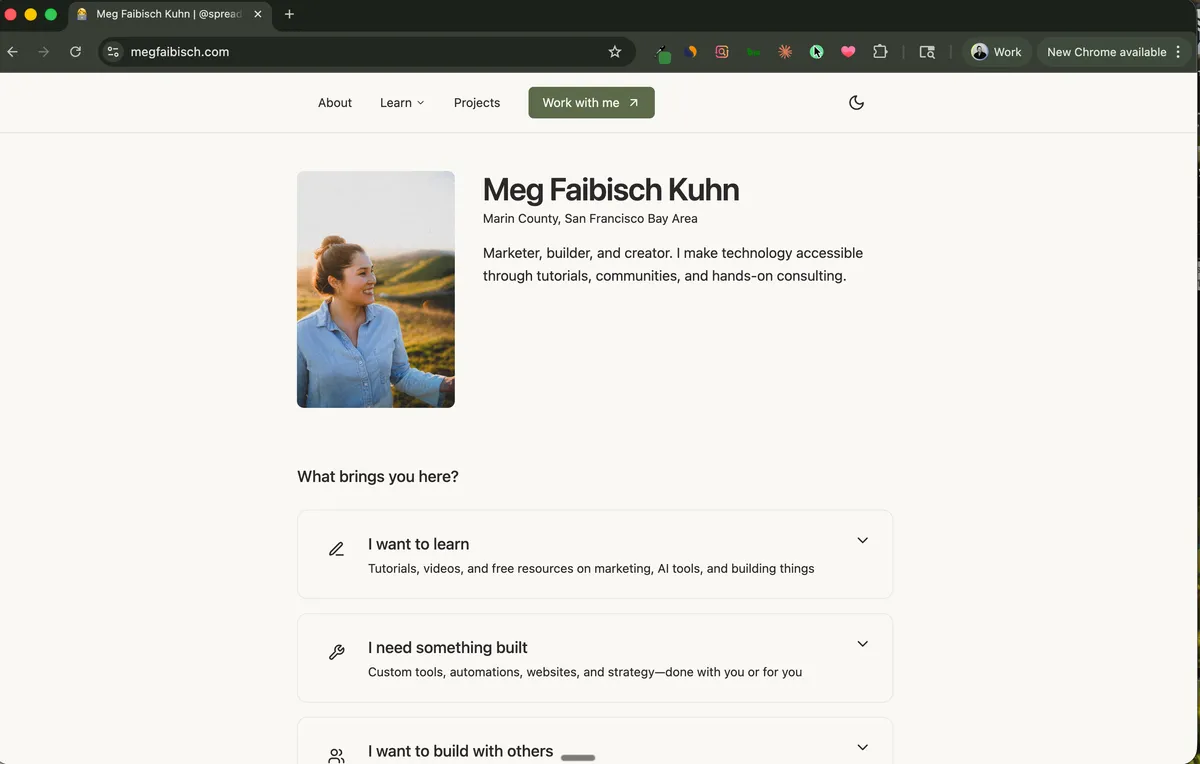
I didn't write the code for this website. I talked it into existence.
If you're reading this on megfaibisch.com, you're looking at a site that was built almost entirely through conversation. No Webflow. No WordPress themes. No hiring a developer. Just me and Claude Code, going back and forth until things looked right.
This is called "vibe coding" - and it's exactly as casual as it sounds.
What Is Vibe Coding?
Vibe coding is when you build software by describing what you want in plain English, looking at the result, and saying "no, more like this" until it matches the vision in your head.
There's no planning phase. No wireframes. No technical specifications. You just... talk to the AI and iterate.
Here's a real example from building this site:
Me: "I want a hero section that feels clean and minimal. My name big, a short tagline underneath, and maybe some social proof badges."
Claude: creates a hero section
Me: "The spacing feels too tight. Can you make it breathe more? And make my name bigger - I want it to be the first thing people see."
Claude: adjusts spacing and typography
Me: "Better. But the badges look cheap. Can you make them more subtle? Like they're part of the design, not floating on top of it."
And we go back and forth like that until it's right. No code review. No debugging. Just conversation.
Why Claude Code Is Surprisingly Good at Design
Here's what surprised me most: Claude Code has genuinely good taste.
I expected it to write functional code. I didn't expect it to understand design principles. But when I say things like "this feels cluttered" or "I want it to feel more premium," it knows what I mean.
Some prompts that actually work:
- "Make this feel more expensive" - It'll add subtle shadows, better typography hierarchy, more whitespace
- "This looks like a template" - It'll break up the symmetry, add visual interest, make it feel more custom
- "The vibe is off" - Genuinely useful. It'll ask clarifying questions or make adjustments based on context
- "Look at [website] for inspiration" - I'll send a screenshot or describe a site I like, and it captures the essence without copying
The key is that you don't need to know CSS or design terminology. You describe the feeling you want, and Claude translates that into code.
My Actual Workflow
Here's how a typical session goes when I'm building something new:
1. Start with the big picture
I'll open Claude Code and say something like:
"I want to add a new page to my website - a media kit for brand partnerships. It should have my stats, audience demographics, past brand deals, and a way for brands to contact me. Look at my existing site for the design language."
Claude will scaffold the whole page. It won't be perfect, but it gives me something to react to.
2. React and refine
This is where vibe coding really happens. I look at what Claude created and just... respond honestly:
- "The stats section is boring. Can you make the numbers bigger and add some kind of visual element?"
- "I don't like how the contact form looks. Can you make it feel more premium, less like a generic form?"
- "Add more whitespace. Everything feels cramped."
I'm not giving technical instructions. I'm giving feedback like I would to a designer.
3. Ask for options
When I'm not sure what I want, I ask Claude to show me alternatives:
"Can you give me three different ways to display testimonials? I'm not sure if I want cards, a carousel, or something else."
It'll create multiple versions and I pick the one that feels right - or combine elements from different options.
4. Trust but verify
After making changes, I'll often ask:
"Does this look good on mobile?" "Is this accessible?" "Did this break anything else on the page?"
Claude checks its own work and catches issues I wouldn't have noticed.
Prompts That Get Great Results
After building an entire website this way, I've learned which prompts work best:
For layout and structure:
- "I want this section to feel more spacious"
- "Can you break this into smaller, scannable chunks?"
- "The hierarchy is confusing - what should my eye go to first?"
For visual design:
- "Make this more visually interesting without adding clutter"
- "The colors feel flat - can you add more depth?"
- "This looks like every other website. How can we make it more memorable?"
For specific elements:
- "The button doesn't feel clickable enough"
- "This text is hard to read - fix the contrast"
- "The animation is too much. Make it subtle or remove it."
For overall vibe:
- "I want this to feel professional but approachable"
- "Less corporate, more personal"
- "Think: premium but not pretentious"
The more specific you are about the feeling, the better the results.
What I Built This Way
Just to give you a sense of what's possible:
This entire website - Every page, every component, every interaction. The blog you're reading, the navigation, the footer, all of it.
A custom blog system - Where I write posts in markdown and they automatically get formatted, categorized, and displayed correctly.
Landing pages - For my directory course, including the pricing section, FAQ accordions, and email capture forms.
My media kit - Complete with animated stats, downloadable assets, and a contact form that goes to my inbox.
Dark mode - Because I mentioned once that "it would be cool to have dark mode" and Claude just... added it.
None of this required me to understand React, TypeScript, or Tailwind CSS (the technologies this site is built with). I just described what I wanted.
The Conversation That Sold Me
Early on, I was skeptical. Could this actually produce something professional? Then I had this exchange:
Me: "I want to add my TikTok follower count to the hero section, but I don't want it to look braggy. How do I display social proof without seeming like I'm showing off?"
Claude: "A few approaches: You could frame it as 'Join X others' which makes it about community rather than status. Or use a subtle badge format that looks like a credential rather than a flex. Or integrate it into the tagline naturally - 'Helping 50K+ creators build with AI' makes the number serve the value prop rather than stand alone."
That's not just code. That's strategic thinking about design and messaging. Claude understood the problem I was trying to solve, not just the technical request.
Tips for Your First Vibe Coding Session
If you want to try this yourself:
1. Start with something that exists
Don't try to build from scratch. Find a website you like and say: "I want something like this, but for [your thing]." Give Claude a reference point.
2. Be honest about what you don't like
The fastest way to get good results is to react genuinely. "I hate this" is useful feedback. "This isn't quite right but I don't know why" is useful too - Claude will ask clarifying questions.
3. Don't settle
If something feels off, say so. You're not wasting Claude's time by iterating. That is the process.
4. Ask "what would make this better?"
Sometimes I don't know what I want. So I ask: "What would make this hero section more engaging? Give me three ideas." Then I pick one.
5. Let Claude see your existing site
If you already have a website or design system, show Claude. Say "match this style" or "keep the same design language." Consistency gets way easier.
The Mindset Shift
The hardest part of vibe coding isn't technical. It's accepting that you can just... ask for things.
I spent years thinking website development required either:
- Learning to code (months of effort)
- Hiring a developer (thousands of dollars)
- Using templates (limited and generic)
Now I just describe what I want and iterate until it's right. The gap between idea and implementation collapsed.
This website would have cost me $5,000-10,000 if I'd hired someone to build it. Instead, it cost me a $20/month Claude subscription and a few evenings of conversation.
Getting Started
If you've never used Claude Code before, I wrote a complete beginner's guide that walks you through installation and first steps.
Once you're set up, try this:
- Find a website you admire
- Open Claude Code in a new project folder
- Say: "I want to build a personal website inspired by [that site]. Let's start with just the homepage."
Then just... talk. Describe what you want. React to what you get. Iterate until it feels right.
That's vibe coding. That's how this whole website got built.
Want to see vibe coding in action? I post behind-the-scenes content on TikTok where I show exactly how I build things with Claude Code.
Want to Build Your Own Website Like This?
I turned my entire process into a step-by-step guide with 20+ copy-paste prompts. Go from zero to a live personal website in one sitting — no coding experience required.